
The core of pet photography is not just documenting what a dog looks like. It is about capturing emotional connection: expressive eyes, a quiet afternoon by the window, and a sense of companionship. In this tutorial, we use GPT Image text-to-image on FuseAI Tools to generate a close-up golden retriever portrait and show how to create warm, story-driven pet imagery with AI.
I. Goal: Emotional Connection, Natural Realism, Square-Ready
We want a dog close-up suitable for pet brands and emotional storytelling content, with:
- Emotional eyes: gentle, thoughtful, expressive gaze.
- Texture detail: visible fur strands, nose texture, and whiskers.
- Atmosphere: rainy window scene with soft, natural light.
- Believability: no "too-perfect AI pet" feeling.
II. Core Parameters (Copy & Paste)
On GPT Image text-to-image, use:
{
  "prompt": "Create a close-up, heartwarming photograph of a golden retriever resting its head on a wooden windowsill, looking out at a rainy garden. The dog's eyes are soft and thoughtful, with visible details in its fur—golden tones, slight curls around the ears. Raindrops streak down the window glass, blurring the green garden outside. Soft, overcast natural light illuminates the dog's face, highlighting the texture of its nose and whiskers. Shot on a 85mm lens, shallow depth of field, focus on the eyes. The image should feel peaceful, loyal, and deeply emotional. No staging, no artificial elements.",
  "aspect_ratio": "1:1",
  "quality": "medium"
}
Parameter Breakdown
- aspect_ratio: 1:1 - square framing, ideal for Instagram posts and pet communities.
- quality: medium - balanced quality and speed for rapid iteration.
- Prompt highlights - eye emotion, fur detail, rain-window lighting, shallow DOF for realism.
III. Generated Result and Quality Analysis
Generated dog close-up:
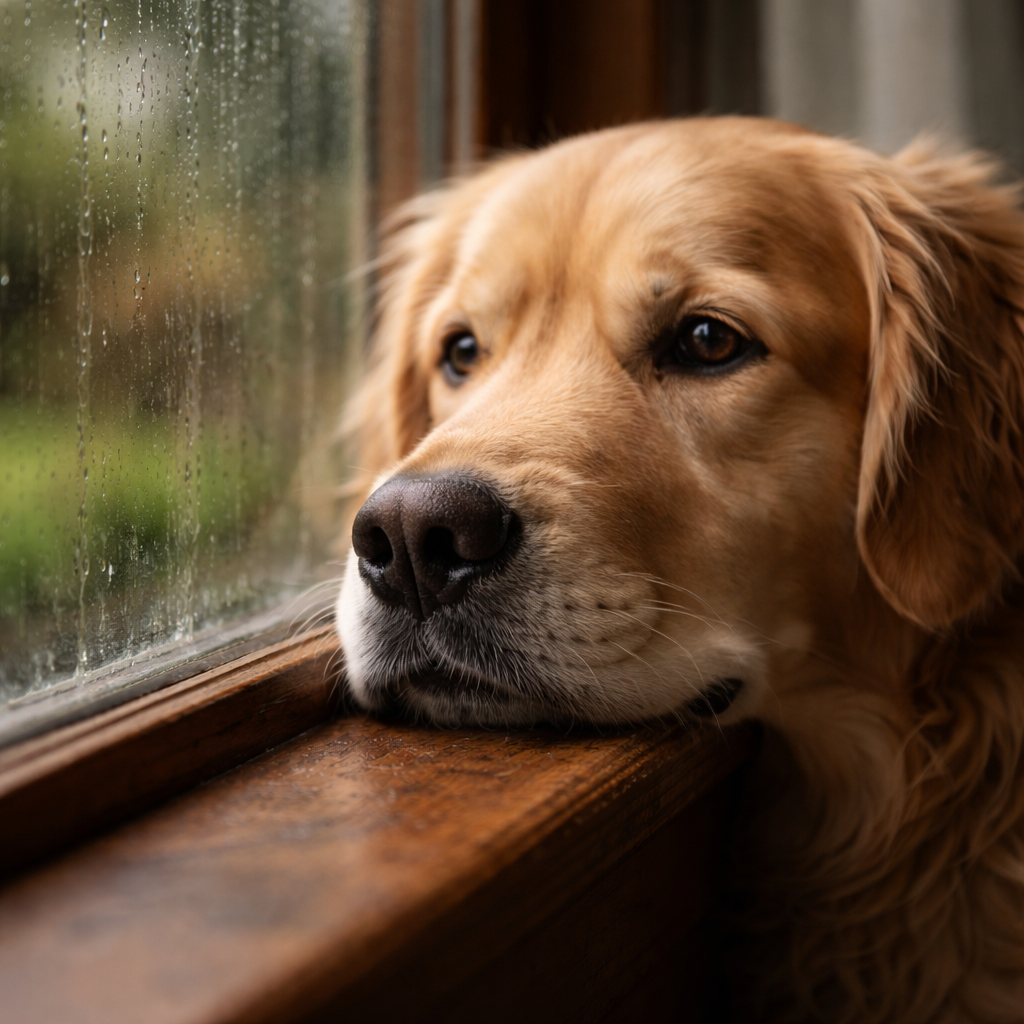
Heartwarming pet portrait generated with GPT-image-1.5
Evaluation
| Dimension | Rating | Notes |
|---|---|---|
| Emotional delivery | ⭐⭐⭐⭐⭐ | Soft, thoughtful eyes with strong emotional pull. |
| Detail rendering | ⭐⭐⭐⭐⭐ | Clear fur texture, nose detail, and whiskers. |
| Atmosphere | ⭐⭐⭐⭐⭐ | Rainy window plus soft light creates calm, healing mood. |
| Realism | ⭐⭐⭐⭐⭐ | Looks like a real photo, with minimal artificial feel. |
| Practical use | ⭐⭐⭐⭐⭐ | Excellent for pet brands and emotional storytelling. |
Best Use Cases
- Pet brand social media campaigns
- Animal welfare communication
- Emotion-focused content visuals
- Pet product advertising creatives
IV. Customize Emotional Pet Imagery for Your Brand
Step 1 - Define the Core Emotion
| Emotion | Prompt Keywords |
|---|---|
| Loyalty / companionship | "waiting by the window, loyal eyes, soft expression" |
| Joy / energy | "running in a field, tongue out, ears flapping, golden hour" |
| Healing / calm | "sleeping on a cozy blanket, peaceful, soft breathing" |
| Curiosity / smartness | "head tilted, ears perked, curious eyes, slightly confused" |
Step 2 - Control Depth and Focus
| Visual Effect | Prompt Keywords |
|---|---|
| Eye emphasis | "shallow depth of field, focus on the eyes, background blurred" |
| Full context | "medium shot, dog in environment, context visible" |
| Extreme detail close-up | "macro shot, nose texture, whisker details, extreme close-up" |
Step 3 - Choose the Right Aspect Ratio
- Instagram post: 1:1
- Vertical story / cover: 2:3
- Horizontal website banner: 3:2
V. Advanced Tips for More Realistic AI Pet Photos
- Describe specific breed traits: use details like
golden retriever,floppy ears,curly fur,short snout. - Focus on eye language: phrases like
soft and thoughtful eyes,loyal gaze,slightly sad expression. - Add environmental micro-details:
raindrops on window,dust particles in sunlight,shadow of a window frame. - Control light quality: prioritize
soft overcast natural lightorgolden hour backlight. - Reduce AI artifacts: include
No perfect symmetry, no artificial smoothness, no plastic texture, no studio backdrop.
VI. Summary
To generate emotional pet portraits with GPT-image-1.5, focus on the story in the eyes: emotional language, fur texture, natural light, and shallow depth of field. This setup works as a reusable pet-imagery template. Fine-tune the breed cues and emotional tone to quickly produce visuals that genuinely move your audience.